Clean code with PHP namespaces
A widespread issue developers run into when building applications is grouping and organizing code correctly so that it is easier for other developers to understand and collaborate. Conflicting class names, functions, and other code blocks is an issue for developers, and PHP offers a way to tackle this problem by adding namespaces to the language in PHP 5.3.
In this article, you will learn everything you need to know to start using PHP namespaces to organize your code efficiently in PHP.
Prerequisites
To follow along with this article, you need to have a solid grasp of the basics of PHP. Knowledge of variables, functions, conditionals, etc., will be helpful.
However, each concept and code example covered in this article will be explained to ensure that everything is clear.
Namespaces in PHP
PHP Namespaces can be described as virtual containers that group related classes, functions, and constants within your PHP code, similar to how folders organize PHP files on a computer. This level of organization becomes increasingly crucial as your applications become more complex.
Imagine your PHP code as a digital library. Without namespaces, you would have a single, massive folder of books with their titles. If you wanted to add a new book, you would risk overwriting existing ones with the same name. This is where namespaces are useful.
They act as separate folders with clear labels, allowing you to have "Fiction\Titles", "Nonfiction\Titles", "Author\Novels", and so on. Each folder keeps related items separate, reducing the chances of conflicts.
Also, namespaces in PHP make it easier to use code from external libraries or frameworks. Imagine borrowing books from different libraries or subscribing to online book services.
Namespaces ensure that you don't accidentally mix up your books with those from other libraries. When you request a book, you specify which library it belongs to, avoiding confusion and potential conflicts with similar titles from different sources.
Now that you understand what PHP namespaces are and how they can be helpful in your code, we’ll explore how to use them in the next section.
Declaring namespaces in PHP
To declare a PHP namespace, you must use the namespace keyword, followed by the namespace name, because any code written in a PHP file without this namespace declaration automatically belongs to the global namespace. A namespace declaration must always appear at the very top of the PHP file, before any other code except declare statements, to ensure PHP can correctly scope all the classes, functions, and constants that follow.
Namespace names are typically structured hierarchically, similar to directories. Here's an example:
namespace Welcome;

class Greeting {
    public function sayHello() {
        echo "Hello from Greeting class inside the Welcome namespace!";
    }
}
The code above declares the PHP file as part of the Welcome namespace; all classes, interfaces, functions, and constants in the file are now part of the Welcome namespace and must be used as such. It's also worth noting that multiple classes can share the same namespace across different files, which is how large frameworks group related components without putting everything in a single PHP file.
Note: The
namespacedeclaration has to come before any code in the file exceptdeclarestatements.
Nesting namespaces in PHP
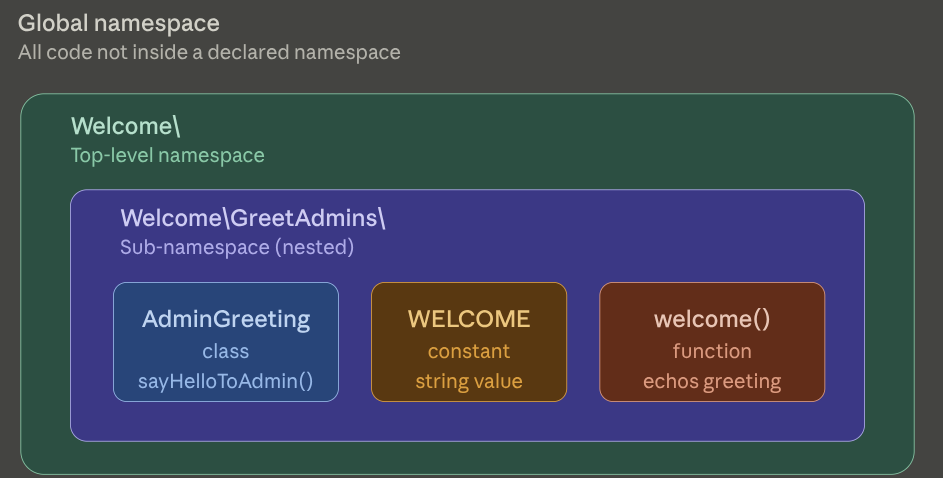
As mentioned in the previous section, namespace names are usually structured like directories. PHP allows you to nest namespaces as much as you want by separating the namespace with a backslash (\) like so:
namespace Welcome\GreetAdmins;

class AdminGreeting
{
    public function sayHelloToAdmin()
    {
        echo "Hello from AdminGreeting class inside the GreetAdmins inside the Welcome namespace!";
    }
}

const WELCOME = "Welcome to the Welcome/GreetAdmins namespace!";

function welcome()
{
    echo "Hello from welcome() function inside the Welcome/GreetAdmins namespace!";
}
The code above defines an AdminGreeting class, a WELCOME constant, and a welcome function inside the Welcome\GreetAdmins namespace. All the code in the PHP file is inside the GreetAdmins namespace, which is nested inside the Welcome namespace.
Note: Nested namespaces are also known as sub-namespaces. You can nest as much as you want.
Let's explore how to use these PHP namespaces in the next section.
Using namespaces in PHP
There are two different ways to use namespaces in PHP, and we will explore them in the following sections.
The prefix method
PHP allows you to use the code inside a namespace in other PHP files by prefixing the code with the namespace name like so:
require_once 'Class.php';

$greeting = new Welcome\Greeting();
$greeting->sayHello();
The code above requires the Class file that contains the namespace code, creates a new Greeting class, and runs the sayHello method on the class. The code should return the following result:
Hello from Greeting class inside the Welcome namespace!
The use operator
You can import a namespace code into another PHP file using the use operator. For example, you can use the code inside the namespace in the previous section like so:
use Welcome\GreetAdmins\AdminGreeting;
use const Welcome\GreetAdmins\WELCOME;
use function Welcome\GreetAdmins\welcome;

require_once 'Class.php';

$greeting = new AdminGreeting();
$greeting->sayHelloToAdmin();

echo "<br>";

echo WELCOME;

echo "<br>";

welcome();
The code above imports the code inside the Welcome\GreetAdmins namespace with the use keyword before using them in the PHP file. The code above will return the following:
Hello from AdminGreeting class inside the GreetAdmins inside the Welcome namespace!
Welcome to the Welcome/GreetAdmins namespace!
Hello from welcome() function inside the Welcome/GreetAdmins namespace!
Furthermore, you can combine multiple use statements in one line like so:
use Welcome\GreetAdmins\{AdminGreeting, AnotherClass};
use const Welcome\GreetAdmins\{WELCOME, ANOTHERCONSTANT};
use function Welcome\GreetAdmins\{welcome, anotherFunction};
Note: The code above is not readable, so you shouldn’t overuse it. It is recommended to have one
usestatement per line.
Now that you understand how to use code inside namespaces in other files, let's explore how to use code from the global namespace inside a namespace code.
Using global namespace code inside a namespace code
As mentioned earlier in the article, any code that is not in a namespace that you declared is in the global namespace.
Using global classes, interfaces, functions, and constants inside the namespace can be tricky because PHP looks for classes inside a namespace class method in the current namespace.
For example, to add a function that prints the current time and day, you have to import the PHP DateTime class with the use operator to avoid errors like this:
// same as nested namespace Welcome\GreetAdmins file above

use DateTime;
class AdminGreeting
{

    // same as above
    public function sayCurrentTimeandDay()
    {
        $dt = new DateTime();
        echo "<br>";
        echo $dt->format('Y-m-d H:i:s l');
    }
}
The code above will work as intended when it is run. Another less readable way to do this is to prefix the DateTime class inside the method with a backslash (\) like so:
class AdminGreeting
{

   // same as above
   public function sayCurrentTimeandDay()
   {
       $dt = new \DateTime();
       // same as above
   }
   // same as above
}
The above method will enable you to remove the use DateTime import from the top of the file, but it is not recommended because it is less readable and might confuse other developers who use or read the code.
Namespace aliasing
PHP allows you to take code organization further by giving classes, interfaces, functions, and constants inside a namespace different names in cases of conflicts.
For example, if you are using a framework or an external library in your code with an AdminGreeting class, you can import a class with an alias without needing to rename your class. Here’s an example:
use Welcome\GreetAdmins\AdminGreeting as AdminGreeter;
If you replace the first line of the previous code block with this line of code, the result should remain the same.
Benefits of using PHP namespaces
As explained above, PHP namespaces provide a way to organize and encapsulate your code to prevent naming conflicts and improve code maintainability. Let's explore some benefits of using namespaces in your PHP applications in the following sections.
Avoiding naming conflicts
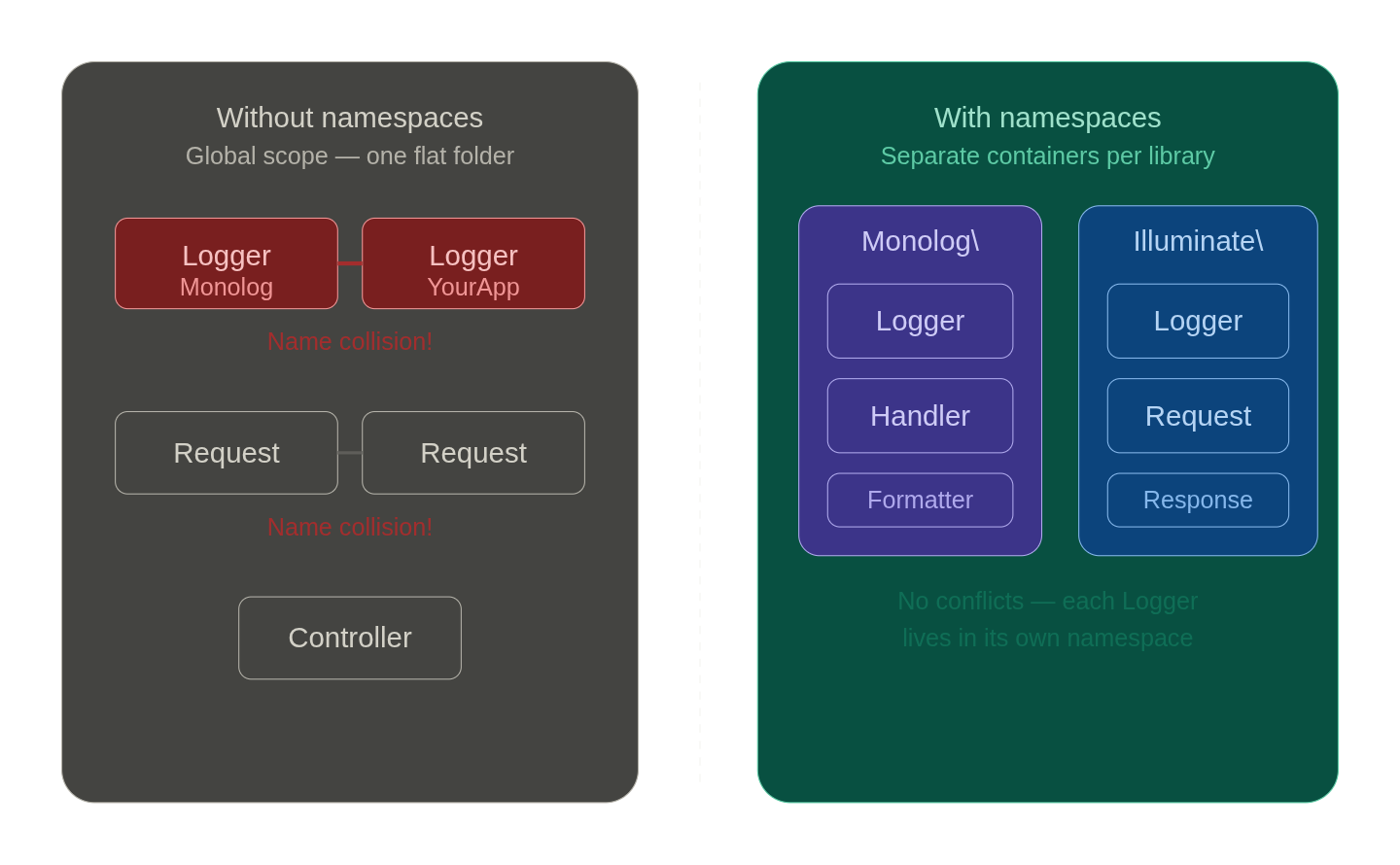
PHP namespaces help prevent naming conflicts by allowing you to have classes, functions, and constants with the same name in different PHP namespaces. This is valuable in larger projects that pull in multiple third-party libraries.
Without namespaces, two packages that both define a Logger or Request class would collide at load time, forcing you to rename one manually.
With namespaces, Monolog\Logger and Illuminate\Http\Request coexist without any ambiguity, because PHP resolves each name relative to its declared namespace. You can even import both into the same file using use aliases: use Monolog\Logger as MonoLogger lets you reference whichever you need without rewriting the underlying library code.
Improved code organization
PHP namespaces allow you to organize code into logical units, making it easier to manage large codebases. The namespace hierarchy maps directly to your directory structure when following PSR-4 autoloading conventions, so App\Services\PaymentService lives at src/Services/PaymentService.php.
The one-to-one relationship in PHP Namespaces means any developer on the team can locate a file purely from its fully qualified class name, without hunting through a flat directory.
It also gives you a natural seam for splitting a monolith: namespaces like App\Billing, App\Notifications, and App\Reporting signal which classes belong together and make it straightforward to extract a namespace into a separate package later.
Code readability
PHP namespaces provide context for your code, making it more readable. A class imported as use App\Auth\TokenValidator immediately tells the reader it is part of the authentication subsystem, whereas a bare TokenValidator class in a flat global namespace carries no such signal.
Context reduces the cognitive load of code review, because you can infer the purpose and scope of a dependency from its namespace before reading a single line of its implementation.
When a junior developer encounters Stripe\Exception\CardException, they know it originates from the Stripe SDK and not from internal error handling code, which shapes how they reason about catching and responding to it.
Encapsulation
PHP namespaces allow you to encapsulate related code and expose only what's necessary. You can hide implementation details in sub-namespaces, making it easier to maintain and evolve your code over time.
For example, a billing module might expose App\Billing\Invoice as its public surface while keeping App\Billing\Internal\PdfRenderer and App\Billing\Internal\TaxCalculator in a sub-namespace that signals they are implementation details not intended for direct use outside the module.
While PHP does not enforce visibility at the namespace level the way Java packages can, the naming convention alone communicates intent to your team. When you later refactor the PDF rendering logic, you know that no code outside App\Billing\Internal should depend on it, giving you confidence to change it without auditing the entire codebase.
Testing isolation
PHP namespaces make it easier to isolate and test different parts of your application.
You can mock or replace classes within specific namespaces, keeping tests independent and deterministic. PHPUnit and mocking libraries like Mockery resolve classes by their fully qualified names, so you can substitute App\Services\Mailer with a test double scoped to a single test without affecting other test suites that rely on the real implementation.
PHP namespaces also enable function mocking via libraries like php-mock, which intercepts calls to built-in functions like time() or file_get_contents() within a specific namespace, letting you control their return values in tests without global side effects. This granularity is impossible in a flat global namespace where every class and function shares the same resolution scope.
Organize your PHP code with namespaces
PHP namespaces solve real problems that emerge as applications grow: naming collisions, tangled dependencies, and codebases that become harder to navigate over time. The namespace keyword, use operator, and aliasing together give you a clean grouping system
One area worth watching is namespace depth. Deeply nested namespaces like App\Module\SubModule\Internal\Helpers can signal that a component needs rethinking rather than more nesting. Your codebase can become significantly easier for any developer to navigate from day one by pairing namespaces with PSR-4 autoloading and a consistent directory structure.
Get new features, monitoring tips, and behind-the-scenes stories from our dev team once a month. Subscribe to the Honeybadger newsletter.

Written by
Adebayo AdamsBeing a self taught developer himself, Adams understands that consistent learning and doing is the way to become self sufficient as a software developer. He loves learning new things and firmly believes that learning never stops.