Temporarily pause error recording
Sometimes you know about an error but aren't ready to fix it yet—maybe you're mid-deploy, or waiting for a third-party fix. Until now, your only option was to permanently ignore the error and hope you'd remember to un-ignore it later.
You can now pause error recording for 1 hour, 1 day, or 1 week. While paused, Honeybadger stops recording new occurrences of that error (so that it doesn't cause notifications or apply to your quota). When the pause expires, recording resumes automatically.
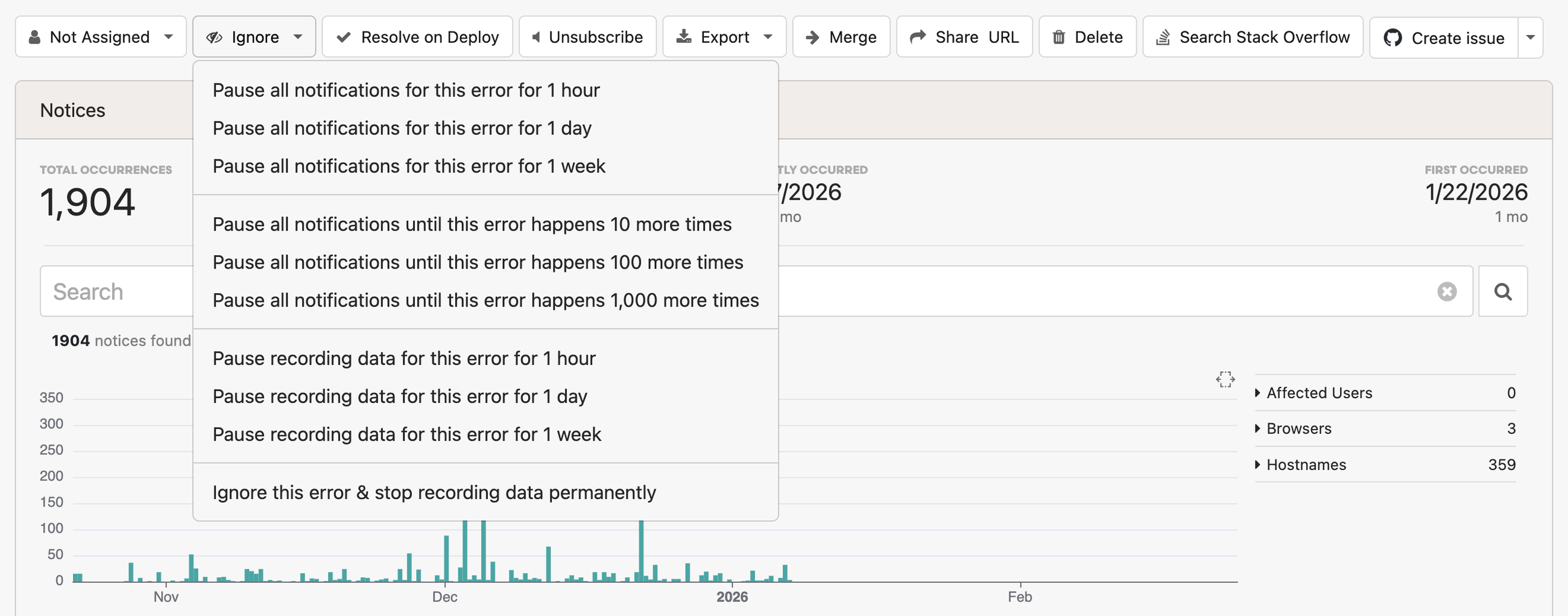
Pause and resume actions are logged in your project's activity feed, so your team always knows when recording was paused and by whom.
How to use it
Open any error and click the Ignore action dropdown. You can choose from three new options:
- Pause recording data for this error for 1 hour — useful during a deploy or quick fix
- Pause recording data for this error for 1 day — good for waiting on a patch or third-party fix
- Pause recording data for this error for 1 week — when you need more time
You can also pause all notifications for an error by time (1 hour, 1 day, or 1 week) or by occurrence count (10, 100, or 1,000 more times), or permanently ignore the error and stop recording data.
See the error monitoring docs to learn more about error tracking in Honeybadger.
Try Honeybadger for FREE
Honeybadger is full-stack application monitoring that helps developers move fast and fix things. Get set up in minutes and check monitoring off your to-do list.
Easy 5-minute setup — No credit card required